
Home » Download

CV99 App Download Guide for Fast, Secure Mobile Play
Fast, secure CV99 app download for confident play on the go
Get the CV99 mobile app for quick access, light data use, and smooth play even on spotty networks. The app keeps you signed in, pushes timely alerts, and opens cricket markets and JILI slots in seconds.
Stay safe with verified account details, name-match on payments, and clear device permissions. For the most trusted install, use the CV99 Official Website link in your browser and sign in with your usual CV99 login to keep everything synced.
Why the CV99 mobile app saves time and boosts confidence for BD players
The app is built for quick taps, low data, and reliable access during busy hours. It keeps cricket fans and slots players close to the action without long page loads.
One-tap access and optional biometric login
Open the app and continue right where you left off. Enable fingerprint or face unlock to secure entry without typing passwords in public.
Faster cricket markets with smarter updates
Cricket odds and scores refresh quickly, so you can react in-play with less waiting. Notifications highlight price moves or market openings you care about.
Stable JILI slots and quick game re-entry
Jump back into your favorite JILI titles fast. The app remembers your last games and reduces reloads after calls or data drops.
Data saver for patchy mobile connections
Compressed images and cached assets cut load times and keep data costs in check, especially during evening peak.
Stronger security with local session locks
Encryption, auto-lock on inactivity, and device-only login controls protect your account on shared phones.
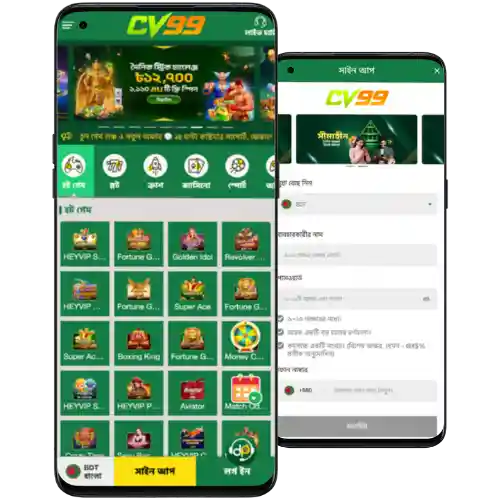
Step-by-step guide to download, install, and open CV99 on your phone
Android users can install quickly by downloading the CV99 APK to your device.
Android installation steps
- Open your mobile browser and visit the official CV99 download page from a trusted link.
- Tap the Android download button and confirm the file save.
- When the file finishes, tap Open. If prompted, allow installs from your browser or file manager in Settings.
- Complete installation, launch the app, and allow notifications for match alerts and offers.
- Sign in with your CV99 login, or create an account, then set up biometric login for faster access.
iPhone access steps
- Open Safari and go to the CV99 mobile site.
- Tap the share icon, then Add to Home Screen to create an app-style icon.
- Open the icon, sign in, and enable notifications for quick cricket and promo updates.
Essential mobile features that keep play fast, informed, and easy to control
- Quick login with PIN or biometrics to reduce typing on the go.
- Real-time cricket odds and score alerts tailored to your favorites.
- Clean menus for Sports, Live, JILI, and Promotions so you find things faster.
- Lightweight build that saves data and loads reliably on 3G or busy networks.
- Smart resume to return to open bets or last-played games instantly.
- In-app notifications for results, boosts, and maintenance windows.
Exclusive app promos, reload perks, and timely campaign alerts for regular players
Look out for app-only boosts during big cricket fixtures and JILI tournaments. Reload days, odds boosts, and mission rewards often land via instant notifications so you never miss a window.
New players can tap CV99 Register to create an account directly in the app and unlock verified-user benefits faster.
Eligible new members may see the CV99 welcome offer highlighted in the promo tray after sign-up and verification. Keep notifications on so you catch time-limited boosts.
For smooth withdrawals later, keep your profile details accurate and make sure your account name matches your chosen payment method.
CV99 app download and installation questions answered in simple, quick steps
Is the CV99 mobile app free to get and use?
Yes. Downloading and installing the app is free. Data charges from your mobile provider may apply.
How do I install on Android if my phone blocks the file?
Open Settings when prompted and allow installs from your browser or file manager. Then reopen the file and continue.
Can I use the app on iPhone without the App Store?
Yes. Open the site in Safari and select Add to Home Screen. You get an app-style icon with quick access.
How do I keep the app updated for best performance?
Enable in-app update prompts or revisit the download page to get the latest version, then install over the existing one.
Why should my profile name match my payment account name?
Name-match helps the team verify requests faster and reduces delays when you deposit or withdraw.
Ready to install CV99 and start faster play with cricket and slots
Your next matchday is easier with one-tap access, quick odds, and stable JILI gameplay. Start your CV99 app download now and keep cricket action and promos within reach.
Install, sign in, and enable notifications. You’ll get speed where it counts, plus clear prompts for updates, offers, and important account alerts.